loader

Activity No. 8: Switching on and off the LED matrix using a distance sensor (IoT sensors kit)

Using the RGB LED matrix and the Time of Flight module with the Nucleo L476 board

To light this RGB LED matrix according to the distance returned by the Time Of Flight distance sensor, the following connection must be made: 
- Connect the NUCLEO-Shield to the connectors on the card. 
- Connect, using the Grove cable, the LED matrix to one of the ports named I2C available as well as the Time Of Flight module to the other I2C port.
- Connect the L476RG board to the computer using the mini-USB cable.

matrix-tof-EN

Let's get to the programming now! 

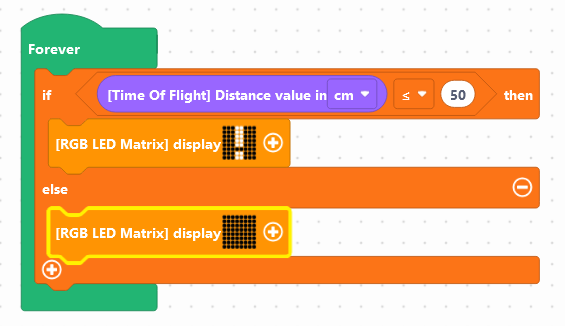
Here is the program we are going to carry out: 
- If the distance (in cm) is less than 50 then
- Display the Vittascience logo! on the matrix
- Else
-

We will use the following blocks:
- "If...then...else", available in the Logic of the block locker,
- ".. < 50", available in the Logic
- "[Time Of Flight] Distance in cm", available in the Sensors,
- "[RGB LED matrix] display..." available in the Display of the blocks locker .


Use the following interface to program the module. The blocks are already available on the work area. Now it's up to you: 


Once the program has been created, it must be copied onto the card. To do this, you must use the "Upload" button (see Activity 0: Getting started with the board)


Did you succeed? Perfect, you now know how to program the LED matrix and the distance sensor using your NUCLEO-L476RG board!
Discover the other activities of the IoT Sensors kit by clicking on the icons below.

corr-mat-en

Licenza d'uso

Licence Creative Commons

Questa risorsa è resa disponibile secondo i termini della Creative Commons Attribution License - Condivisione alle stesse condizioni 2.0 France